calendar_month 2026-07-22
The Ultimate Guide to Automating Crypto Telegram Channels: How EchoPost Solves the Pain of Manual Posting

## The Challenge: Managing a High-Volume Crypto Telegram Channel
Running a crypto-focused Telegram channel is a demanding task. You need to share real-time price alerts, project updates, market analysis, and community news—often across multiple channels. Doing this manually is not only time-consuming but also error-prone. Missing a critical update or posting at the wrong time can cost you subscribers and trust.
### Why Manual Posting Fails in Crypto
- **Speed**: Crypto markets move 24/7. Manual posting can't keep up with breaking news.
- **Consistency**: Irregular posting schedules lead to lower engagement.
- **Scalability**: Managing 5+ channels manually is nearly impossible without automation.
- **Human Error**: Typos, wrong links, or duplicate posts damage credibility.
## The Solution: Crypto Telegram Auto Poster with EchoPost
EchoPost is a powerful software designed to automate Telegram channels. It acts as a **crypto telegram auto poster**, allowing you to schedule, queue, and auto-post content from various sources (RSS feeds, APIs, custom scripts) directly to your Telegram channels. No coding required.
### Key Features for Crypto Channels
- **Multi-Channel Support**: Post to unlimited channels simultaneously.
- **Smart Scheduling**: Set posting frequency and time zones to match your audience.
- **Content Curation**: Auto-fetch news from CoinMarketCap, CoinGecko, or your own sources.
- **Custom Formatting**: Use Markdown, emojis, and inline buttons to make posts engaging.
- **Analytics**: Track open rates and click-throughs to optimize your strategy.
## Step-by-Step: Automating Your Crypto Telegram Channel with EchoPost
### Step 1: Download and Install EchoPost
First, [download EchoPost](/downloads/echopost-windows-client) and install it on your Windows machine. The setup takes less than 2 minutes.
### Step 2: Connect Your Telegram Channels
- Launch EchoPost and click "Add Channel".
- Authenticate using your Telegram bot token (create one via @BotFather).
- Select the channels you want to automate.
### Step 3: Configure Content Sources
- **RSS Feeds**: Add URLs of crypto news sites (e.g., Cointelegraph, Decrypt).
- **Custom APIs**: Connect to CoinGecko for price alerts.
- **Manual Queue**: Upload a CSV with pre-written posts.
### Step 4: Set Posting Schedule
Define when and how often to post. For example:
- Every hour during market hours.
- Every 30 minutes for urgent alerts.
- Random intervals to avoid spam filters.
### Step 5: Launch and Monitor
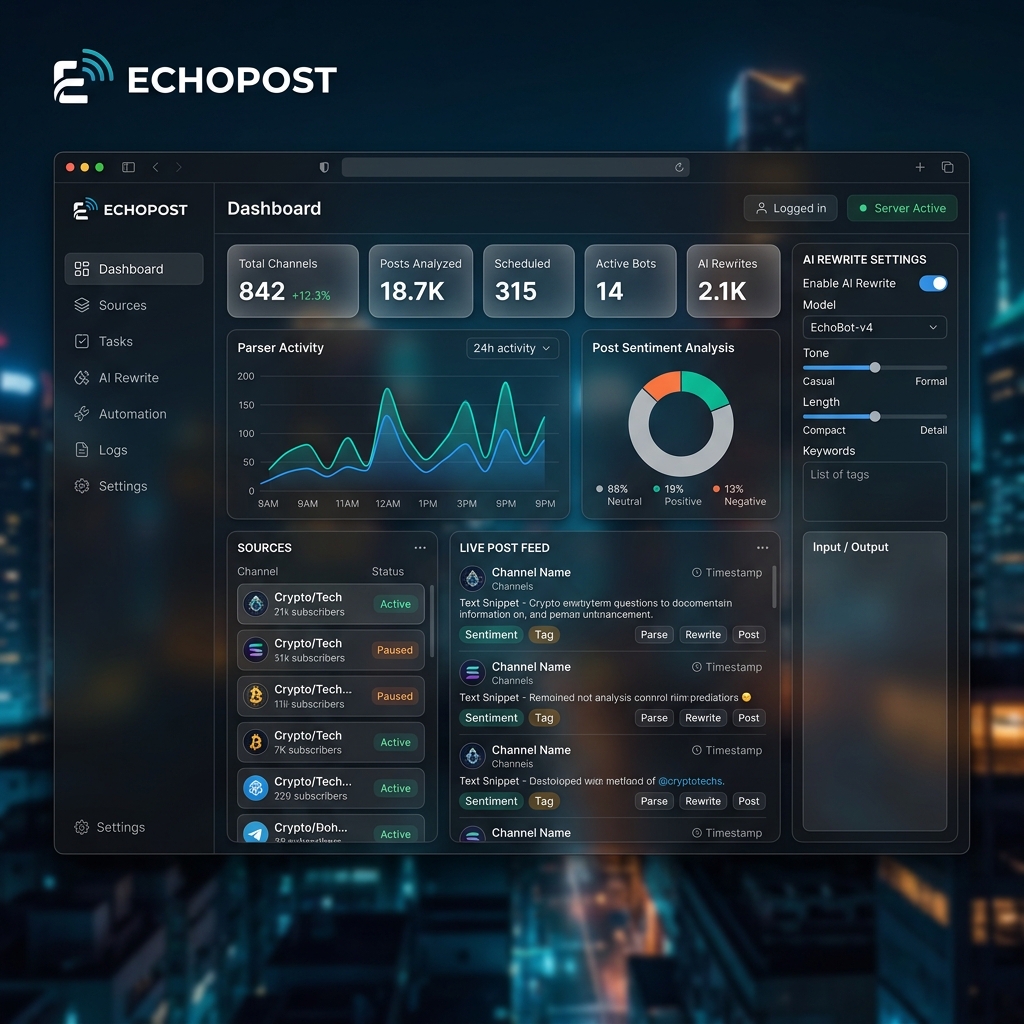
Hit "Start Automation". EchoPost will begin posting. Use the dashboard to monitor performance—pause, edit, or delete posts on the fly.
## Practical Tips for Success
- **Use Mix of Content**: Combine news, charts, and community polls.
- **Test Timing**: Post at different hours to find peak engagement.
- **Add Value**: Always include a short commentary or question to spark discussion.
- **Track Analytics**: Use EchoPost's built-in stats to refine your strategy.
## Why EchoPost is the Best Crypto Telegram Auto Poster
Unlike generic bots, EchoPost is built for high-volume, professional channels. It handles **crypto telegram auto poster** tasks with precision, reliability, and speed. Thousands of channel admins trust it to grow their communities without burnout.
### Real Results
- *"I saved 10+ hours per week automating my crypto signals channel."* — Alex, Crypto Trader
- *"EchoPost helped me double my subscribers in 2 months by posting consistently."* — Maria, DeFi Educator
## Stop Posting Manually. Start Growing.
If you're serious about your crypto Telegram channel, automation is no longer optional—it's essential. EchoPost gives you the tools to scale, stay relevant, and engage your audience 24/7.
[Download EchoPost now](/downloads/echopost-windows-client) and transform your channel management today.
Running a crypto-focused Telegram channel is a demanding task. You need to share real-time price alerts, project updates, market analysis, and community news—often across multiple channels. Doing this manually is not only time-consuming but also error-prone. Missing a critical update or posting at the wrong time can cost you subscribers and trust.
### Why Manual Posting Fails in Crypto
- **Speed**: Crypto markets move 24/7. Manual posting can't keep up with breaking news.
- **Consistency**: Irregular posting schedules lead to lower engagement.
- **Scalability**: Managing 5+ channels manually is nearly impossible without automation.
- **Human Error**: Typos, wrong links, or duplicate posts damage credibility.
## The Solution: Crypto Telegram Auto Poster with EchoPost
EchoPost is a powerful software designed to automate Telegram channels. It acts as a **crypto telegram auto poster**, allowing you to schedule, queue, and auto-post content from various sources (RSS feeds, APIs, custom scripts) directly to your Telegram channels. No coding required.
### Key Features for Crypto Channels
- **Multi-Channel Support**: Post to unlimited channels simultaneously.
- **Smart Scheduling**: Set posting frequency and time zones to match your audience.
- **Content Curation**: Auto-fetch news from CoinMarketCap, CoinGecko, or your own sources.
- **Custom Formatting**: Use Markdown, emojis, and inline buttons to make posts engaging.
- **Analytics**: Track open rates and click-throughs to optimize your strategy.
## Step-by-Step: Automating Your Crypto Telegram Channel with EchoPost
### Step 1: Download and Install EchoPost
First, [download EchoPost](/downloads/echopost-windows-client) and install it on your Windows machine. The setup takes less than 2 minutes.
### Step 2: Connect Your Telegram Channels
- Launch EchoPost and click "Add Channel".
- Authenticate using your Telegram bot token (create one via @BotFather).
- Select the channels you want to automate.
### Step 3: Configure Content Sources
- **RSS Feeds**: Add URLs of crypto news sites (e.g., Cointelegraph, Decrypt).
- **Custom APIs**: Connect to CoinGecko for price alerts.
- **Manual Queue**: Upload a CSV with pre-written posts.
### Step 4: Set Posting Schedule
Define when and how often to post. For example:
- Every hour during market hours.
- Every 30 minutes for urgent alerts.
- Random intervals to avoid spam filters.
### Step 5: Launch and Monitor
Hit "Start Automation". EchoPost will begin posting. Use the dashboard to monitor performance—pause, edit, or delete posts on the fly.
## Practical Tips for Success
- **Use Mix of Content**: Combine news, charts, and community polls.
- **Test Timing**: Post at different hours to find peak engagement.
- **Add Value**: Always include a short commentary or question to spark discussion.
- **Track Analytics**: Use EchoPost's built-in stats to refine your strategy.
## Why EchoPost is the Best Crypto Telegram Auto Poster
Unlike generic bots, EchoPost is built for high-volume, professional channels. It handles **crypto telegram auto poster** tasks with precision, reliability, and speed. Thousands of channel admins trust it to grow their communities without burnout.
### Real Results
- *"I saved 10+ hours per week automating my crypto signals channel."* — Alex, Crypto Trader
- *"EchoPost helped me double my subscribers in 2 months by posting consistently."* — Maria, DeFi Educator
## Stop Posting Manually. Start Growing.
If you're serious about your crypto Telegram channel, automation is no longer optional—it's essential. EchoPost gives you the tools to scale, stay relevant, and engage your audience 24/7.
[Download EchoPost now](/downloads/echopost-windows-client) and transform your channel management today.